How Do I Know If My Website Is Outdated? 9 Signs to Look For

How Do I Know If My Website Is Outdated?

9 signs to look for, and how to decide whether you need a refresh or a full redesign

A website is outdated when it no longer reflects your business, serves your users well or supports what the business needs to do next. Its age alone doesn’t decide it. The most common signs are a poor mobile experience, slow performance, out-of-date content, confusing navigation, unreliable features, a site your team finds hard to update, and no clear way to tell whether it’s working.

You open your website on your laptop and, at first glance, everything seems fine. The logo is there. The pages load. The contact form still exists. Nothing is obviously broken.

Then you open it on your phone.

The text feels cramped. The navigation takes a little too much effort. One page still describes a service you stopped offering two years ago. The images take a while to appear. And when you compare it with a competitor’s site, theirs somehow feels easier to understand.

Your website still works. But is it still doing its job?

That’s the more useful question. A website doesn’t become outdated simply because it has been online for three, five or even ten years. Some older sites keep performing perfectly well. Others start creating friction much sooner.

A website isn’t outdated because it’s old. It’s outdated when it stops reflecting your business, serving your users or supporting what you need to do next.

So how do you know when you’ve reached that point? Here are the signs worth looking for.

The 9 Signs Your Website Is Outdated

  1. It no longer reflects your business
  2. The mobile experience feels like an afterthought
  3. It feels slow
  4. Visitors have to work too hard to understand what you do
  5. You’re reluctant to send people to it
  6. Your team finds it difficult to update
  7. Important features no longer work reliably
  8. It isn’t supporting search or discovery
  9. You can’t tell whether it’s working

1. Your Website No Longer Reflects Your Business

Businesses often change faster than their websites. You may have launched new services, entered new markets, sharpened your positioning or developed a much clearer sense of what makes you different. Yet your website may still describe the company you were several years ago.

This is one of the clearest signs of an outdated website. A potential customer should be able to understand what you do now, who you do it for and why they should consider working with you.

If you regularly find yourself saying, “Ignore what the website says — we actually do something slightly different now”, the problem isn’t cosmetic. Your website is presenting an outdated version of the business.

Sometimes better content and messaging will fix this without a redesign. But if the whole structure of the site is built around services, audiences or priorities that no longer matter, a bigger rethink may be needed.

2. The Mobile Experience Feels Like an Afterthought

One of the easiest tests is simply to use your website on your phone. Not just to check that the page loads, but to actually try to get something done. Ask yourself:

  • Can you read the text comfortably without zooming?
  • Is the navigation easy to understand and use?
  • Are buttons and links easy to tap?
  • Do forms work properly?
  • Does the most important information appear in a sensible order?
  • Can you complete the main task without getting frustrated?

A site can be technically “responsive” and still offer a poor mobile experience. Google’s page experience guidance points to mobile usability, Core Web Vitals, security and overall ease of use as parts of a good page experience.

If your site was clearly designed for desktop first, and the mobile version feels like everything has been squeezed onto a smaller screen, it’s time to revisit the experience rather than tweak a few dimensions.

3. Your Website Feels Slow

People often notice a slow website before they can explain what’s wrong. A page takes too long to appear. Images load in stages. Buttons don’t respond straight away. The layout shifts while someone is trying to read.

None of this necessarily means you need a new website. Oversized images, unnecessary scripts, third-party tools, plugins, tracking code, heavy animation and poorly optimised code can all slow a site down, and many of these can be fixed in isolation.

But persistent slowness is a warning sign. Performance shapes how a website feels, and a site that keeps people waiting can make even a strong brand seem less polished. Google includes Core Web Vitals within its page experience considerations, while stressing that site owners should focus on the overall experience rather than chasing a perfect score.

So the useful question isn’t just “Is our PageSpeed score good?” It’s: does the website feel fast and responsive to the people actually using it?

4. Visitors Have to Work Too Hard to Understand What You Do

A website can look modern and still be outdated in a more important way: it no longer matches how your customers think.

Open your homepage and imagine you know nothing about the business. Within the first few seconds, can you tell what the company offers, who it’s for and where to go next? If the answer involves lots of scrolling, decoding jargon or clicking through several pages, the site has a clarity problem.

This usually happens gradually. New products, services and messages get added over time. Each addition makes sense on its own, but eventually the site becomes crowded with competing information. The result is a website that contains everything but explains very little.

Good user experience is often less about adding more and more about helping people understand what matters at the right moment. If years of content have piled up without anyone rethinking the structure around it, that’s a strong sign the site needs attention.

5. You’re Reluctant to Send People to It

This isn’t a technical metric, but it’s surprisingly revealing. When someone asks about your company, do you confidently send them to your website? Or do you immediately add a disclaimer?

  • “We’re actually updating it.”
  • “The website is quite old.”
  • “That page isn’t really accurate anymore.”
  • “Just message me directly instead.”

If your own team avoids using the website as a sales or communication tool, that tells you something. Customers use your website to validate your business, and if it lags well behind the quality of the work you actually deliver, that gap matters.

An outdated visual style alone isn’t always a reason to rebuild. Design trends change constantly, and chasing each one rarely pays off. The real question is whether the site still creates the impression you want customers to have.

6. Your Team Finds the Website Difficult to Update

Customers aren’t the only people who use your website. Someone inside the business has to run it.

If publishing a new page needs a developer every time, swapping an image feels risky, or nobody remembers how the content management system works, the website may no longer suit the organisation behind it.

This matters more as businesses grow. A site built when one person managed everything may now need to serve marketing, sales and product teams. Or the reverse: a complex platform built for a large team may now be maintained by one person. The right website matches how your business actually operates. If routine changes have become slow or expensive, the outdated part may not be anything visitors see. It may be the technology and administration behind it.

7. Important Features No Longer Work Reliably

Small technical issues have a way of accumulating:

  • A contact form that occasionally fails
  • A search function that returns poor results
  • A checkout that behaves differently across devices
  • An integration that needs constant manual intervention
  • A plugin that breaks whenever something else is updated

One broken feature doesn’t automatically mean you need a redesign. Often the right fix is to repair or replace that one area.

But if your team is routinely working around the website rather than with it, technical debt is becoming a business problem. The warning sign isn’t that something broke. It’s that the site has become hard to change without breaking something else.

8. Your Website Isn’t Supporting Search or Discovery

The way people find businesses is changing. Customers still arrive through traditional search, but they also discover companies through social platforms, AI-assisted search, recommendations and marketplaces. Across all of these, your website remains a core source of information.

If your content is thin, out of date, poorly structured or hard to follow, it becomes harder for both people and search systems to understand what you offer.

Google continues to recommend helpful, reliable, people-first content, and has said that established SEO best practices still apply to visibility in its AI-powered search features. That doesn’t mean every older website needs an “AI optimisation project”. It means the fundamentals matter:

  • Clear, accurate information about what you do
  • Genuinely useful content
  • A logical page structure
  • Strong pages built around what your business truly knows and does

If your website no longer provides these, its age may be affecting discoverability as well as user experience.

9. You Can’t Tell Whether the Website Is Working

Every website should have a purpose: generating enquiries, selling products, supporting customers, taking bookings, explaining a complex service or helping people find information.

If you can’t tell whether it’s achieving that purpose, you have a measurement problem. Perhaps analytics were never set up properly, tracking broke during an earlier update, or nobody ever defined what success looks like.

This is especially common with older sites, because measurement needs evolve. A business that once cared only about traffic may now need to understand lead quality, enquiry sources, product behaviour or where people drop out of a journey.

Sometimes an outdated website doesn’t need a new design at all. It needs to start giving the business the information it needs to make better decisions.

Does an Outdated Website Always Need a Full Redesign?

No. This is probably the most important point in this article. Recognising that your website is outdated doesn’t mean you should rebuild it from scratch. Often the right answer is more targeted:

If the main problem is…A better first step might be…
Outdated or unclear messagingNew content and a messaging refresh
Visitors getting lostClearer navigation and page structure
Slow loadingA performance audit and optimisation
Poor experience on phonesImproved mobile layouts and templates
Fragile features or pluginsTargeted technical fixes or upgrades
No idea what’s workingProper analytics and goal tracking

A full website redesign makes sense when the problems are structural: the business has changed significantly, the technology is no longer fit for purpose, the user journeys no longer work, or meaningful improvements have become too difficult within the existing site.

The mistake is deciding on a redesign before understanding the problem.

A redesign is an expensive way to fix the wrong thing.

How Can I Tell What Actually Needs to Change?

PerspectiveQuestion to ask
BusinessDoes it still represent what we do, who we serve and why we’re different?
User experienceCan people quickly understand us and complete the tasks that matter?
TechnologyIs it fast, reliable, secure and manageable for our team?
ResultsIs it measurably helping the business achieve its goals?

This assessment gives you a much clearer answer than asking whether the design “looks old”. A five-year-old website that performs well, reflects the business and is easy to maintain may need very little. A two-year-old website that customers struggle to use may already need serious attention.

Age is context. Performance is evidence.

So, Is Your Website Outdated?

The clearest sign of an outdated website isn’t the year it was built. It’s the gap between what the website does today and what your business and customers now need it to do.

If the business has moved on but the website hasn’t, if users are struggling, if the site is hard to maintain, or if you no longer trust it to support your growth, those are signals worth investigating. But investigate before you rebuild.

The right question isn’t “Do we need a new website?” It’s:

“What is our current website stopping us from doing?”

Answer that first, and the right next step becomes much easier to see.

Not sure where your website stands? Built by Naif can review your website across business fit, user experience, technology and results, and tell you honestly whether it needs a refresh, targeted fixes or a full redesign.


Frequently Asked Questions

How old is too old for a website?

There’s no fixed age at which a website becomes outdated. Judge it on how well it reflects the business, serves users, performs technically and supports current goals. An older website that still does those things well may not need replacing.

What are the main signs that a website is outdated?

Common signs include poor mobile usability, slow performance, out-of-date content or branding, confusing navigation, unreliable features, difficulty updating the site, and a mismatch between the website and the business as it is today.

Do I need a full redesign if my website is outdated?

Not always. Many websites can be improved through targeted changes to content, UX, performance, templates, functionality or analytics. A full redesign is usually more appropriate when the problems are structural or the existing platform makes meaningful improvement difficult.

Can an outdated website affect SEO?

Yes. Slow performance, weak mobile usability, outdated or unhelpful content and a confusing site structure can all make a website less useful to visitors and less effective in search. Good SEO still depends on strong fundamentals: helpful content, clear structure and a good overall page experience.

What’s the difference between a website refresh and a redesign?

A refresh improves an existing site, for example by updating content, visuals, performance or individual templates, while keeping its overall structure and platform. A redesign rethinks the site more fundamentally, often including its structure, user journeys and underlying technology.

How often should I review my website?

Rather than waiting for a fixed redesign cycle, review your website whenever there’s a significant change in your business, audience, products, technology or customer behaviour. Regular checks on performance, usability and analytics also help you spot problems before they become larger ones.
How to Choose the Right Web Development Agency: The RIGHT Framework

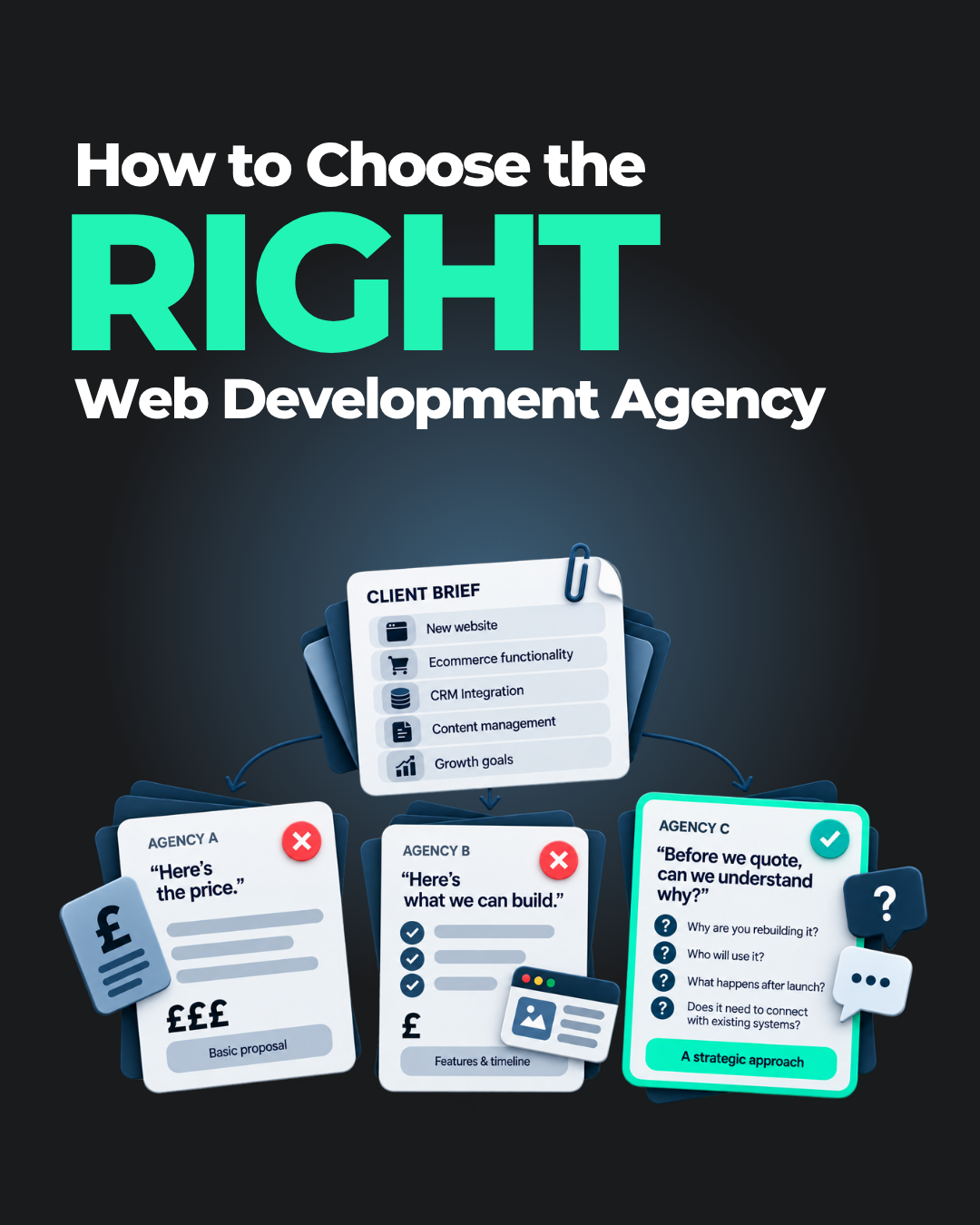
You send the same website brief to three web development agencies.

The first replies quickly with a surprisingly low quote. The second sends across a polished proposal filled with impressive terminology, timelines and a long list of features. The third takes a little longer and, instead of immediately telling you what they can build, starts asking questions.

What is the website actually meant to achieve? Who will use it? What happens after someone submits an enquiry? Who will manage the website once it is live? Does it need to connect with any existing systems? Why are you rebuilding it in the first place?

At first, those questions can feel like unnecessary complication. You asked for a website, not a business consultation.

But they may tell you more about the agency than the proposal itself.

Choosing the right web development agency is not simply about finding a company that can build a website. Plenty of companies can do that. The more important question is whether they can build the right website for your business — and whether they understand enough about your goals, customers and operations to make good decisions along the way.

That is why choosing a website development company purely on portfolio, technology or price can be misleading. A beautiful website can still be difficult to use. An impressive technical solution can be unnecessarily complex. And a cheap quote can represent excellent value — or simply leave out half of what you thought you were buying.

So, how do you choose a web development agency that is actually right for your business?

A useful way to evaluate your options is the RIGHT framework:

R — Requirements
I — Insight
G — Governance
H — Handover
T — Transparency

These five areas help you look beyond attractive portfolios and headline prices to understand how an agency thinks, how it works and what it will actually be like to build a website with them.

R — Requirements: Does the Web Development Agency Understand What You Need?

A good website project starts before anyone opens a design tool or writes a line of code. It starts with understanding the problem.

You may already have a detailed brief. You may know that you want a new ecommerce website, a customer portal or a complete redesign. You may even know which platform you want to use.

That is useful, but a strong web development agency should still want to understand what sits behind those requirements.

Suppose you tell an agency that you want live chat on your website. One response would be to add live chat to the proposal and move on. Another would be to ask what customers are trying to achieve when they use it, what questions they usually ask, who will respond to those enquiries, whether your team can support it throughout the day and whether some of those questions could be answered more effectively elsewhere on the website.

The first agency is responding to the feature you requested. The second is trying to understand the problem the feature is meant to solve. That distinction matters because businesses often approach website projects with solutions already in mind.

“We need Shopify.”

“We need AI.”

“We need a customer portal.”

“We need to redesign the homepage.”

Sometimes those decisions are absolutely right. But sometimes the real problem is somewhere else.

A conversion issue may actually be a content issue. A navigation problem may not require an entire redesign. A request for new technology may be better solved by improving an existing process. A new feature may add complexity without creating any meaningful value for the customer.

The agency does not need to challenge every request for the sake of it. What you are looking for is evidence that the solution follows the requirement, rather than the other way around.

Pay close attention to the questions an agency asks before it provides a quote. They often reveal how deeply the team is trying to understand your business and whether they are thinking beyond the immediate build.

I — Insight: Can They Bring Thinking as Well as Execution?

A portfolio is usually one of the first things businesses look at when choosing a web development agency, and that makes sense. You want to know whether the team can produce work of a good standard.

But there is a danger in judging an agency purely on whether you like how its websites look. Websites are not posters. They have jobs to do.

A visually impressive homepage may still fail to tell people what the business actually offers. A beautiful ecommerce store may make products difficult to find. A minimalist interface can look sophisticated while making users work far too hard to understand what they should do next.

When you review an agency’s previous work, try to understand the thinking behind it.

Why was the website structured the way it was? How did the agency decide what information belonged on the homepage? What did it do to make the customer journey easier? Why was a particular platform chosen? How did the solution accommodate the client’s internal team? Were there integrations or operational requirements that shaped the build?

Even when detailed project data is confidential, a strong web development partner should usually be able to explain the reasoning behind its decisions. That ability matters because web development rarely exists in isolation.

A website touches content, design, user experience, search, analytics, performance, accessibility, marketing and sometimes internal business systems. Not every project needs a complex strategy covering all of those areas, but the agency should understand how they affect one another.

There is little value in driving more traffic to a website if the landing experience is confusing. There is little value in creating a beautifully designed content hub if the internal team cannot easily update it. And there is little value in adding new functionality if it makes the website slower, harder to use or more difficult to maintain.

The best agency for your project is therefore not necessarily the one that says yes to the most things. It may be the one that can explain why some things are worth doing and others are not.

G — Governance: Is There a Clear Web Development Process?

Good ideas are only useful if the project can actually deliver them. Website projects have a habit of becoming complicated.

A new stakeholder joins halfway through and has a different opinion. Content arrives later than expected. Someone assumes a feature is included when it was never discussed. Feedback gets spread across email, WhatsApp, meetings and comments in design files. A seemingly small change begins to affect three other parts of the website.

This does not necessarily mean something has gone badly wrong. It is simply what happens when multiple people, decisions and dependencies are involved.

That is why project governance matters. Before choosing a web development agency, understand how it plans to manage the work from discovery through design, development, testing and launch.

Who will be your main point of contact? How will feedback be collected? How many revision stages are included? When will you be expected to review designs? What happens if a new requirement appears halfway through the project? How are changes to the agreed scope handled?

You should also understand what the agency expects from you.

Website projects are collaborative. If your team needs to supply product information, imagery, website copy or approvals by certain dates, that needs to be clear. An agency cannot manage a timeline effectively if key inputs arrive unpredictably.

The goal is not to find an agency with the most complicated project-management methodology. In fact, too much process can become a problem of its own. What matters is that the project feels controlled.

Everyone should know what has been agreed, what is happening now, what happens next and who is responsible for moving it forward. A clear web development process does more than protect the timeline. It also protects the quality of the work because decisions are made deliberately rather than rushed through at the end.

H — Handover: What Happens After the Website Goes Live?

Launch day gets a lot of attention.

It is exciting. Months of planning, designing, writing and development finally become something real. But for the business, launch is the beginning of using the website, not the end of the project.

Someone will need to update content. Products may need changing. New team members will need access. Software will need maintaining. Integrations may need attention. Campaigns may require new landing pages. A form will eventually need changing. Something, at some point, will need fixing.

That is why website development should not end with someone sending you a message saying, “Your site is live.” Before appointing an agency, understand what handover, website maintenance and post-launch support actually look like.

Will your team receive training? Will you have the access you need to manage the website? Is documentation included? Who owns the hosting account, domain, licences and third-party services? If the agency provides ongoing support, what exactly does that cover?

You should also ask how easy the website will be for your own team to manage. This is an area where the most technically impressive solution is not necessarily the best one.

A complex architecture may offer enormous flexibility, but if your marketing team needs developer support every time it wants to change a banner, publish a page or update an image, that flexibility may not be particularly useful in practice.

The right solution should reflect the reality of the organisation using it. If you have an experienced digital team, that may justify more complexity. If the website will be managed by one person who also has five other responsibilities, ease of use may matter much more.

A good web development agency thinks about both audiences: the people visiting the website and the people responsible for running it.

T — Transparency: Do You Understand Exactly What You Are Buying?

Eventually, every agency selection reaches the question of price.

And price matters.

Every business has a budget, and there is nothing wrong with comparing web development quotes carefully. The problem begins when price becomes the only thing that is compared. Two website quotes can look like they are pricing the same project when, in reality, they are offering very different things.

One proposal may include discovery, information architecture, UX design, bespoke interface design, responsive development, integrations, analytics configuration, testing, content migration, training and post-launch support.

Another may include the development of ten pages using an existing template. Both may result in something called “a website”.

They are not the same scope.

That is why a significantly cheaper quote should not automatically be treated as a bargain, just as a more expensive quote should not automatically be treated as better.

The more useful question is:

What am I actually getting for each price?

Look carefully at what is included, what is excluded and what could incur additional cost later.

Does the price include responsive design for mobile and tablet? Who is responsible for the content? Is content migration included? What happens if you need additional pages? Are third-party licences included? How many revision rounds are available? Is testing part of the scope? What kind of support is provided after launch?

The more transparent the proposal, the easier it becomes to compare value properly.

You should also pay attention to how the agency discusses budget. A good partner should be able to explain where the money is going and, where necessary, help you prioritise.

Perhaps everything on the original wishlist cannot fit into phase one. That does not necessarily mean the project has failed before it begins. It may simply mean identifying which functionality creates the most value now and which can be introduced later.

That is a much healthier conversation than quietly reducing quality or removing important work simply to meet a number.

Questions to Ask a Web Development Agency Before You Hire Them

The RIGHT framework gives you a useful way to compare agencies, but it also helps to go into your conversations with a few practical questions.

Before signing with a web development company, consider asking:

  • What do you need to understand about our business before recommending a solution?
  • Who will actually be working on our project?
  • What does your web development process look like?
  • How will feedback and revisions be handled?
  • How do you manage changes to the agreed scope?
  • What will you need from our team during the project?
  • How do you approach mobile usability and website performance?
  • How do you consider accessibility and search visibility during development?
  • What testing happens before the website goes live?
  • Will our team be able to update the website ourselves?
  • Will we receive training or documentation?
  • Who owns the website, hosting accounts, licences and other services after launch?
  • What ongoing website support and maintenance do you provide?
  • What exactly is included in the quote?
  • What could result in additional costs?
  • How will we know whether the new website is successful?

You are not looking for a perfect scripted answer to every question.

What matters is whether the agency can explain its approach clearly, whether its recommendations make sense for your business and whether there are any major assumptions hiding inside the proposal.

The RIGHT Framework Only Works if the Relationship Feels Right Too

Requirements, Insight, Governance, Handover and Transparency give you a practical way to compare web development agencies, but there is one thing that is harder to capture in a spreadsheet: the working relationship.

A website project may last weeks or months. During that time there will be feedback, decisions, changes of direction and moments when something does not work exactly as expected.

You need to be able to communicate with the people on the other side.

Notice what happens before the contract is signed.

Does the agency listen carefully, or does every conversation return to what it wants to sell? Does the team explain technical decisions in language you can understand? Are they comfortable telling you when something may not be worth the investment? Do they ask questions when something is unclear? Are they honest about limitations?

You do not need the agency to agree with every idea you have.

In fact, an agency that agrees with absolutely everything may not always be giving you the advice you need.

What you want is a team that can challenge ideas constructively, explain its reasoning and still respect that the final decisions belong to the business.

The strongest client-agency relationships tend to feel less like placing an order and more like solving a problem together.

How Do You Choose the Best Web Development Agency for Your Business?

There is no single best web development agency for every organisation.

A small brochure website does not need the same team, process or technical capability as a multi-market ecommerce platform. A start-up launching its first website may have very different priorities from an established company replacing a business-critical digital platform.

That is why the question should not simply be:

“Who is the best web development agency?”

It should be:

“Who is the right web development agency for this business, this website and this stage of growth?”

The RIGHT framework gives you a practical way to answer that question.

Does the agency understand your Requirements, rather than jumping straight to a solution?

Does it bring Insight and explain the thinking behind its recommendations?

Is there enough Governance to keep the project structured and collaborative?

Has the agency planned for Handover, support and the day-to-day reality of managing the website?

And is it Transparent about scope, pricing, responsibilities and limitations?

If the answers to those questions give you confidence, you are already looking beyond the things that make agencies easy to compare — portfolios, platforms and prices — and towards the things that are much more likely to determine whether the project works.

Before making the final decision, there is one last question worth asking:

Do we trust this team to make good decisions when the answer is not obvious?

Because building pages is only one part of web development.

The real value of the right web development partner is helping you decide what should be built, how it should work and why it matters to your business.

Frequently Asked Questions

How do I choose a web development agency?

Start by looking at more than the agency’s portfolio or price. Consider how well it understands your requirements, whether it can explain the thinking behind its recommendations, how it manages website projects, what happens after launch and how transparent it is about scope and cost. The right agency should fit both the technical needs of the project and the way your business needs to work.

What should I look for in a web development company?

Look for relevant experience, strong problem-solving skills, a clear web development process, good communication and transparency around pricing. It is also important to understand how the agency approaches user experience, responsive design, performance, testing, handover and ongoing website support.

How should I compare web development quotes?

Do not compare only the total cost. Compare the scope behind each quote. Check whether strategy, UX and design, development, responsive behaviour, integrations, testing, content migration, training, maintenance and post-launch support are included. Two proposals that both promise “a website” may contain very different amounts of work.

Should I choose the cheapest web development agency?

Not necessarily. A lower quote may represent excellent value, but it may also include a smaller scope or fewer services. Equally, a higher price does not automatically mean a better website. The important thing is to understand exactly what each agency is providing and whether it matches what your business actually needs.

What questions should I ask a web development agency?

Ask how the agency determines requirements, who will work on your project, how its development process works, how feedback and scope changes are managed, what testing is included, how your team will manage the site after launch and what ongoing support is available. You should also ask for a clear explanation of what is and is not included in the quote.

How long does it take to build a website?

There is no single timeline that applies to every website. The duration depends on the size and complexity of the project, how much custom design or functionality is required, integrations, content readiness, feedback cycles and testing. A good agency should be able to explain the stages of the project and provide a realistic timeline based on your specific requirements.

Chat on WhatsApp